Modifying Views
Modifiers are used to customize the appearance and behaviour of views in a declarative way. Many of the built-in modifiers in Vizia can be applied to any View, which includes built-in views as well as user-defined views.
Customize a view with a modifier
Modifiers are functions which are called on a Handle, which is returned by the constructor of all views. Applying modifiers to a view changes the properties of a view without rebuilding it. For example, we can use the background_color() modifier to set the background color of a label view:
Label::new(cx, "Hello World")
    .background_color(Color::rgb(255, 0, 0));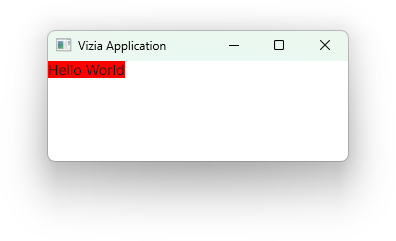
Multiple modifiers can be chained together to acheieve more complex view configuration.
Label::new(cx, "Hello World")
    .width(Pixels(200.0))
    .border_width(Pixels(1.0))
    .border_color(Color::black())
    .background_color(Color::rgb(200, 200, 200));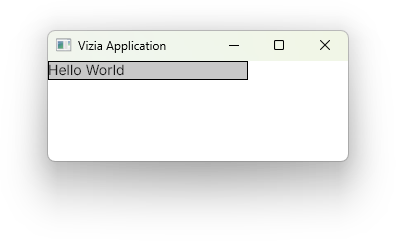
View specific modifiers
Some views have modifiers which are specific to that view type. For example, the Slider view has a modifier for setting the slider range:
let value = Signal::new(50.0);

Slider::new(cx, value)
    .range(0.0..100.0);
View specific modifiers can still be combined with regular modifiers, and the order doesn’t matter. Both of these produce the same result:
Slider::new(cx, value)
    .range(0.0..100.0)
    .width(Pixels(200.0));
Slider::new(cx, value)
.width(Pixels(200.0))
.range(0.0..100.0);Modifier bindings
Many modifiers also accept a signal as well as a value. When a signal is supplied to a modifier, a binding is set up which will update the modified property when the signal changes. For example:
let color = Signal::new(Color::rgb(255, 0, 0));

Label::new(cx, "Hello World")
    .background_color(color);
Custom View Modifiers
To create a set of custom view modifiers, first declare a trait with the desired modifier functions. The modifier functions must take self by value and return Self.
pub trait CustomModifiers {
    fn title(self) -> Self;
}
Next, we can implement the custom modifiers for all views like so:
impl<'a, V: View> CustomModifiers for Handle<'a, V> {
    fn title(self) -> Self {
        self.font_size(24.0).font_weight(FontWeightKeyword::Bold)
    }
}
Sometimes it may be more appropriate to implement the custom modifiers for specific views. For example, we can implement the custom modifiers just the Label view like so:
impl<'a> CustomModifiers for Handle<'a, Label> {
    fn title(self) -> Self {
        self.font_size(24.0).font_weight(FontWeightKeyword::Bold)
    }
}
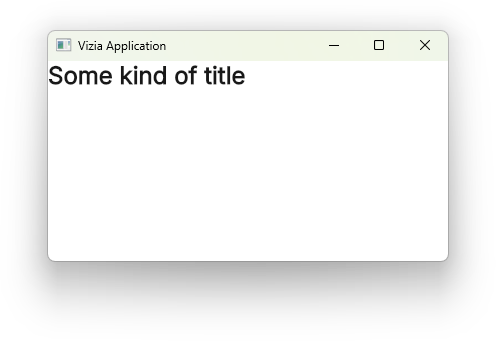
As long as CustomModifiers is imported we can then use the custom title() modifier like any other modifier on a label:
Label::new(cx, "Some Kind of Title").title();